

Navigating the complexities of modern work and personal life often feels like a constant battle against the clock. Deadlines loom, tasks multiply, and the precious hours of the day seem to vanish faster than ever. In this perpetually busy landscape, the ability to effectively manage your time is no longer a luxury but a fundamental necessity. This is where time tracking apps emerge as invaluable allies, offering a precise lens through which to view and optimize your most finite resource: time.
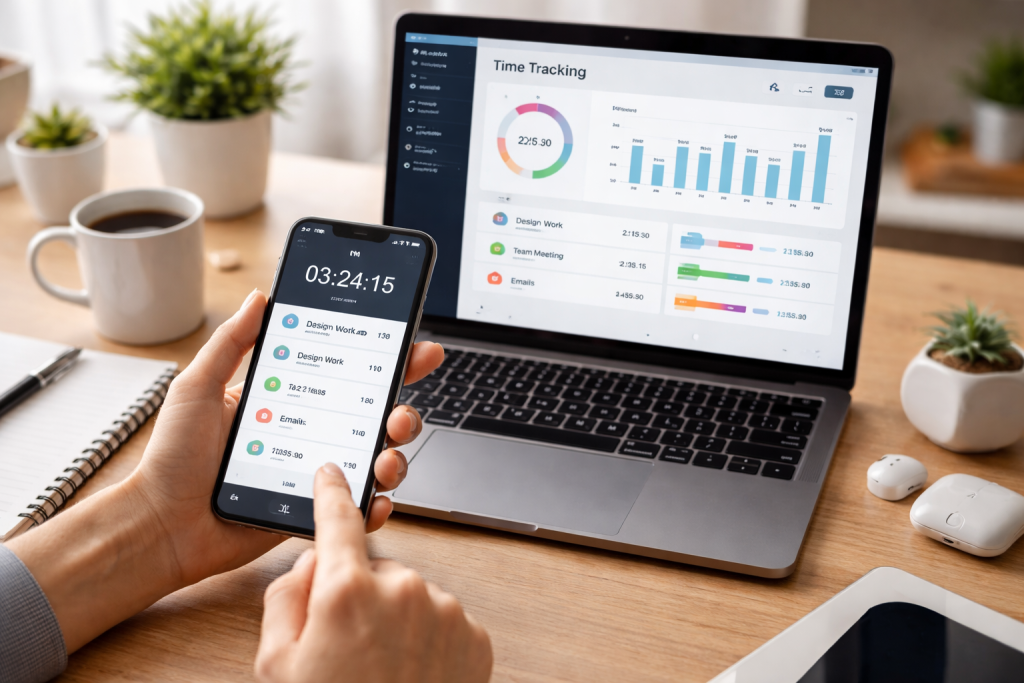
At its core, a time tracking app is a digital tool designed to record and visualize how you spend your time. Imagine a meticulous, tireless assistant who silently notes every minute you dedicate to a specific task, project, or client. These applications range from simple timers to sophisticated platforms offering robust reporting, invoicing capabilities, and team management features. Their primary purpose is to bring a level of analytical precision to your daily activities, transforming opaque estimates into quantifiable data. This data, in turn, empowers you to make informed decisions about your workflow, identify time sinks, and foster a more efficient approach to your responsibilities.
Contents
- 1 The Fundamental Concept of Time Tracking
- 2 Evolution of Time Tracking Solutions
- 3 Enhanced Productivity and Efficiency
- 4 Improved Project Management and Budgeting
- 5 Accurate Client Billing and Invoicing
- 6 Better Work-Life Balance
- 7 Intuitive User Interface and Ease of Use
- 8 Robust Reporting and Analytics
- 9 Seamless Integration Capabilities
- 10 Mobile Accessibility and Offline Tracking
- 11 Team Collaboration and Management Features
- 12 Toggle Track
- 13 Clockify
- 14 Harvest
- 15 ClickUp
- 16 RescueTime
- 17 Identifying Time Sinks and Distractions
- 18 Fostering Better Focus and Accountability
- 19 Optimizing Workflow and Prioritization
- 20 Project Management Software Integration
- 21 Accounting and Invoicing System Integration
- 22 Calendar and Scheduling Tool Integration
- 23 Assess Your Specific Requirements (Individual vs. Team, Freelancer vs. Agency)
- 24 Consider Your Budget and Scalability Needs
- 25 Evaluate Ease of Use and Learning Curve
- 26 Test Drive Multiple Options with Free Trials
- 27 A Freelancer’s Journey to Accurate Billing and Increased Profitability
- 28 A Small Business Optimizing Project Delivery and Resource Allocation
- 29 Inconsistent Tracking Habits
- 30 Over-Complicating Task Categories
- 31 Using Data for Micromanagement, Not Improvement
- 32 AI-Powered Automated Tracking and Categorization
- 33 Integration with Wearable Technology and Biometric Data
- 34 Holistic Time Management Platforms
The Fundamental Concept of Time Tracking
Time tracking isn’t about micromanagement; it’s about gaining insights. By logging time spent, whether manually or automatically, individuals and organizations can understand where resources are allocated, how long tasks truly take, and where bottlenecks might exist. This foundational understanding is the first step toward improvement.
Evolution of Time Tracking Solutions
From handwritten timesheets to complex enterprise software, time tracking has evolved significantly. Early methods were often tedious and error-prone. Modern apps, however, leverage advanced technology to offer intuitive interfaces, seamless integrations, and powerful analytics, making the process not just bearable but genuinely beneficial.
The advantages of integrating time tracking apps into your daily routine are multifaceted, extending beyond mere record-keeping to profoundly impact productivity, profitability, and personal well-being.
Enhanced Productivity and Efficiency
Perhaps the most immediate benefit is the direct impact on productivity. By knowing precisely where your time goes, you can identify distractions, prioritize tasks more effectively, and eliminate unproductive habits. This newfound awareness allows for targeted improvements in your workflow, leading to more work accomplished in less time.
Improved Project Management and Budgeting
For teams and businesses, time tracking is indispensable for project management. Accurate time logging translates directly into more precise project estimates, better resource allocation, and adherence to budgetary constraints. It provides a clear picture of project profitability and helps prevent scope creep.
Accurate Client Billing and Invoicing
Freelancers and agencies rely heavily on time tracking for accurate client billing. Transparency in hours worked builds trust and ensures fair compensation for services rendered. Many apps offer integrated invoicing features, streamlining the entire billing process.
Better Work-Life Balance
Understanding how much time you dedicate to work versus personal activities can highlight imbalances. Time tracking can reveal if you’re consistently overworking or spending too much time on non-essential tasks, prompting adjustments that lead to a healthier work-life balance.
When selecting a time tracking app, a discerning eye for features is critical for making sure it aligns perfectly with your individual or organizational needs.
Intuitive User Interface and Ease of Use
A complex app will deter consistent use. Look for applications with clean, intuitive interfaces that make starting, stopping, and categorizing tasks effortless. The goal is to reduce friction in the tracking process.
Robust Reporting and Analytics
Meaningful data is the cornerstone of effective time management. High-quality apps offer comprehensive reports that visualize time spent by projects, clients, tasks, and even users. These analytics should be customizable, exportable, and provide actionable insights.
Seamless Integration Capabilities
Your time tracking app shouldn’t exist in a vacuum. It should integrate smoothly with other tools you already use, such as project management software, accounting platforms, or calendar applications. This creates a unified ecosystem for all your work processes.
Mobile Accessibility and Offline Tracking
In today’s mobile-first world, an app needs to be accessible from anywhere. A strong mobile app and the ability to track time offline are essential for flexible work environments, syncing once an internet connection is restored.
Team Collaboration and Management Features
For teams, features like shared projects, user roles, permission settings, and team timesheet approvals are critical. These functionalities facilitate collaboration, ensure accountability, and streamline administrative tasks.
Excellent time-tracking apps, each with unique strengths, flood the market. Here’s a brief overview of some of the leading contenders.
Toggle Track
Known for its simplicity and generous free tier, Toggl Track is ideal for individuals and small teams. It boasts a clean interface, powerful reporting, and seamless integrations. Its versatility makes it suitable for a wide range of users, from freelancers to project managers.
Clockify
Often lauded as a truly free time tracker for unlimited users, Clockify offers robust features typically found in paid alternatives. It’s excellent for teams looking for comprehensive project tracking, detailed reports, and even some invoicing capabilities without the hefty price tag.
Harvest
Harvest is a robust solution that goes beyond mere time tracking, offering project budgeting, expense tracking, and integrated invoicing. It’s particularly well-suited for agencies and service-based businesses that need to manage projects and client billing comprehensively.
ClickUp
While primarily a project management tool, ClickUp incorporates powerful time tracking directly within its platform. This makes it ideal for teams who want a unified solution for managing tasks, tracking time, and collaborating without switching between multiple applications.
RescueTime
RescueTime takes a more automated approach, silently monitoring your computer usage and categorizing activities. It offers analyses of how much time you spend on productive versus distracting websites and applications, helping you understand your digital habits.
The direct link between using time tracking apps and increased productivity is undeniable, driven by several key mechanisms.
Identifying Time Sinks and Distractions
By logging every minute, you quickly gain an objective view of where your time is truly going. This often reveals surprising patterns, highlighting unproductive habits, excessive context switching, or time spent on low-value tasks that can drain your focus and energy. Armed with this knowledge, you can proactively address these time sinks.
Fostering Better Focus and Accountability
The act of starting a timer for a specific task can act as a mental trigger, signaling to your brain that it’s time to focus. It creates a sense of accountability, knowing that your time spent is being recorded. This often leads to reduced procrastination and a more concentrated effort on the task at hand.
Optimizing Workflow and Prioritization
Regularly reviewing your time tracking data helps you understand how long various tasks actually take versus your initial estimates. This allows for more realistic planning, better prioritization of critical activities, and the ability to allocate sufficient time to complex projects, preventing rushed work and burnout.
The ability of time tracking apps to communicate and share data with other essential business and personal tools often unlocks their true power.
Project Management Software Integration
Connecting your time tracker to tools like Asana, Trello, Jira, or ClickUp ensures that time logged against tasks directly updates project progress, facilitating more accurate project timelines and resource allocation. This eliminates redundant data entry and creates a single source of truth for project status.
Accounting and Invoicing System Integration
For businesses and freelancers, integration with accounting software such as QuickBooks or Xero drastically streamlines the billing process. Time spent on client projects can be automatically pulled into invoices, reducing errors and saving significant administrative time.
Calendar and Scheduling Tool Integration
Some advanced time trackers can integrate with your calendar, automatically populating time entries based on scheduled meetings or events. This provides a holistic view of your day, comparing planned activities with actual time spent and helping to refine future scheduling.
With a plethora of options available, making the right choice requires careful consideration of your specific circumstances.
Assess Your Specific Requirements (Individual vs. Team, Freelancer vs. Agency)
Are you tracking time for personal productivity, a small team, or a large enterprise? Freelancers might prioritize invoicing, while large organizations may need robust team management and detailed reporting. Define your core needs first.
Consider Your Budget and Scalability Needs
Many apps offer free tiers or trials, which are excellent for testing. Evaluate not just the current cost but also how the pricing scales as your needs grow. Will it remain affordable if your team expands?
Evaluate Ease of Use and Learning Curve
A powerful app that’s too difficult to learn will likely go unused. Prioritize an intuitive interface and a smooth onboarding process. The goal is to reduce friction, not add it.
Test Drive Multiple Options with Free Trials
The best way to know if an app is a good fit is to try it. Take advantage of free trials to test the features, interface, and overall user experience before committing to a subscription.
The transformative impact of time tracking is best illustrated through the experiences of those who have embraced it.
A Freelancer’s Journey to Accurate Billing and Increased Profitability
Sarah, a freelance graphic designer, struggled with underbilling and uncertainty about project profitability. By implementing a time tracking app, she gained precise data on how long each design phase truly took. This allowed her to quote projects more accurately, present transparent invoices to clients, and ultimately increase her hourly rate and overall income, confident in the value of her time.
A Small Business Optimizing Project Delivery and Resource Allocation
A marketing agency, facing challenges with missed deadlines and misallocated resources, introduced a time-tracking solution. In just a few months, they pinpointed the project types that consistently exceeded budget and the team members who often faced overwork. This enabled them to reallocate tasks more efficiently, set more realistic client expectations, and deliver projects on time and within budget, significantly improving client satisfaction and team morale.
While highly beneficial, time tracking can be counterproductive if certain pitfalls are not avoided.
Inconsistent Tracking Habits
The most significant mistake is inconsistent use. Skipping days or failing to accurately categorize tasks renders the data unreliable and diminishes the insights gained. Regularity and diligence are paramount.
Over-Complicating Task Categories
Resist the urge to create an overly complex hierarchy of tasks. Too many categories can make tracking burdensome and lead to analysis paralysis. Keep it simple and focused on key areas.
Using Data for Micromanagement, Not Improvement
Time tracking data should empower, not intimidate. If used to micromanage employees or chastise them for perceived inefficiencies, it can foster resentment and lead to inaccurate tracking as individuals try to “look busy” rather than genuinely improve. Focus on identifying systemic issues and opportunities for growth.
The landscape of time management is constantly evolving, driven by advancements in artificial intelligence and automation.
AI-Powered Automated Tracking and Categorization
Expect a future where AI plays a more prominent role in automatically sensing what you’re working on and categorizing it. This could involve analyzing active applications, document content, or meeting schedules to create time entries with minimal manual input.
Integration with Wearable Technology and Biometric Data
Beyond traditional devices, wearable technology might offer new dimensions to time tracking, perhaps even incorporating biometric data to understand focus levels or periods of high productivity, blending time management with well-being insights.
Holistic Time Management Platforms
The trend points towards more integrated, holistic platforms that not only track time but also manage tasks, projects, communications, and even team well-being. These platforms will aim to be the central hub for all aspects of work and personal organization, leveraging predictive analytics to offer even greater efficiency and balance.
Embracing a time tracking app is more than just adopting another piece of software; it’s a strategic decision to gain clarity, exert control, and ultimately optimize your most valuable asset: time. By selecting the right tool and integrating it thoughtfully into your routine, you can unlock a new level of productivity and achieve a more balanced, fulfilling life.

About the Author
Muqadas Ali is the founder of SmartLearningWay with over 5 years of experience in blogging and digital learning. His mission is to help students and professionals improve productivity using simple methods and modern tools.


